This is documentation for the integration of Guest House widgets on websites maintained by Adeprimo.
1 – General settings
General settings for the plugin can be made in wp-admin under Settings > Guesthouse.
- Hotel ID – The domain where the booking engine is hosted and the widget should be loaded from. Should not include
https://(egbook.example.com). - Main Booking ID – The widget ID for the normal/default booking widget. Will be used on eg the home page and /book/.
- Language Specific Hotel IDs – see below
- Available Widgets – Lists the widgets and its IDs that can be used. This list is loaded from the Guest House API.
1.1 – Language Specific Hotel IDs
For hotels that use different booking domains based on the language (eg book.example.se and book.example.com, this can be set by checking Enable Language-specific Hotel IDs and press Save.
The website needs to use the WPML WordPress plugin for the translation management to use this. The solution require that both book.-domains is connected to the same Guest House instance and that all widgets can be loaded from both domains.
When the settings page have been refreshed, new setting fields will appear with one Hotel ID field for each language set up in WPML.
Fill in the Hotel ID booking domain that each language is supposed to use and save.
The Hotel ID is still used to fetch all widget IDs from the Guest House API. The Main Booking ID provided will still be used for fallback and on generic widgets such as on the front page.
Example
This hotel has two languages set up: Swedish and English.
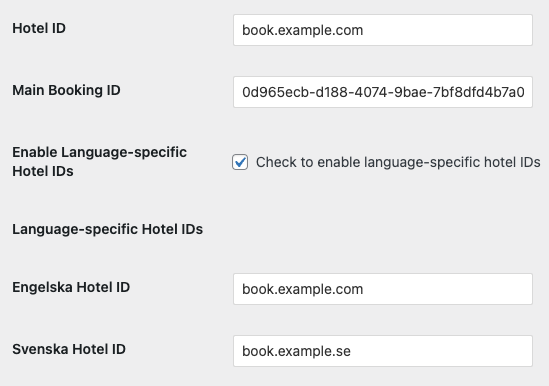
When visiting the Swedish website, the Guesthouse widget will be loaded from book.example.se.
When visiting the English website, the Guesthouse widget will be loaded from book.example.com.
2 – WordPress Block to add widget
If you use the drag-and-drop block editor to build you pages, a block is available to insert the calendar.
In the editor, click on the blue plus button in the left top corner and search/choose the block guesthouse-calendar.
- Widget ID – Choose the widget you want to use in the dropdown list. The list is loaded from Guest House.
- Type – The type of calendar you want to use. Note: If you change the type, you need to save the page and reload the editor to see the new type.
- Width – To set the width of the widget in pixels. Note the recommended recommended widths that you see below this field.
- Alignment – Choose if you want the calendar to be left, center or right aligned in the area.
- Is Booking Page? – Check this if the block is put in a generic booking page, eg
/book/. If checked, the title and widget ID can be populated by the url. See Create booking links below. This is in most cases unchecked. - Padding – This field can be used to add padding/whitespace around the calendar if needed.
Note
If the right hand column with the settings are note shown, you might need to open it in your editor. Click on this button in the top right corner:

3 – Create booking links
On pages where a calendar is inserted with the Is Booking Page? setting checked, it will take any title and widget ID you provide via the URL to populate the widget.
Two URL parameters can be used:
title– The title to be shown in connection to the widgetguid– The widget ID that should be loaded
Example
https://example.com/book/?title=Weekendpackage&guid=1234-5678-9012-3456
Title = Weekendpackage
Widget ID (guid) = 1234-5678-9012-3456
4 – Shortcodes
With the plugin, the widget can be inserted via the shortcode [guesthouse-widget]. Fill in like this:
[guesthouse-widget guid="1234-5678-9012-3456" type="dropdown/calendar"]
Change the numbers after guid=" to the widget id from Guesthouse.
The type of widget to show can be changed after type=". See the Guest House widget user guide for available types and their names.
5 – Languages
The plugin automatically sends the language of the page when loading the widget.
The language is fetched from the html lang parameter in the webpage sourcecode.
Note: See 1.1 Language Specific Hotel IDs for websites that needs to use different Guest House domain urls depending on website language.